A phone designed to stay with you.
A battery wears out. A charging port breaks. The rest of the phone may still be useful. Fairphone’s Gen. 6 gives those everyday failures their own replacement parts—and a route to fitting them.
 NL Netherlands
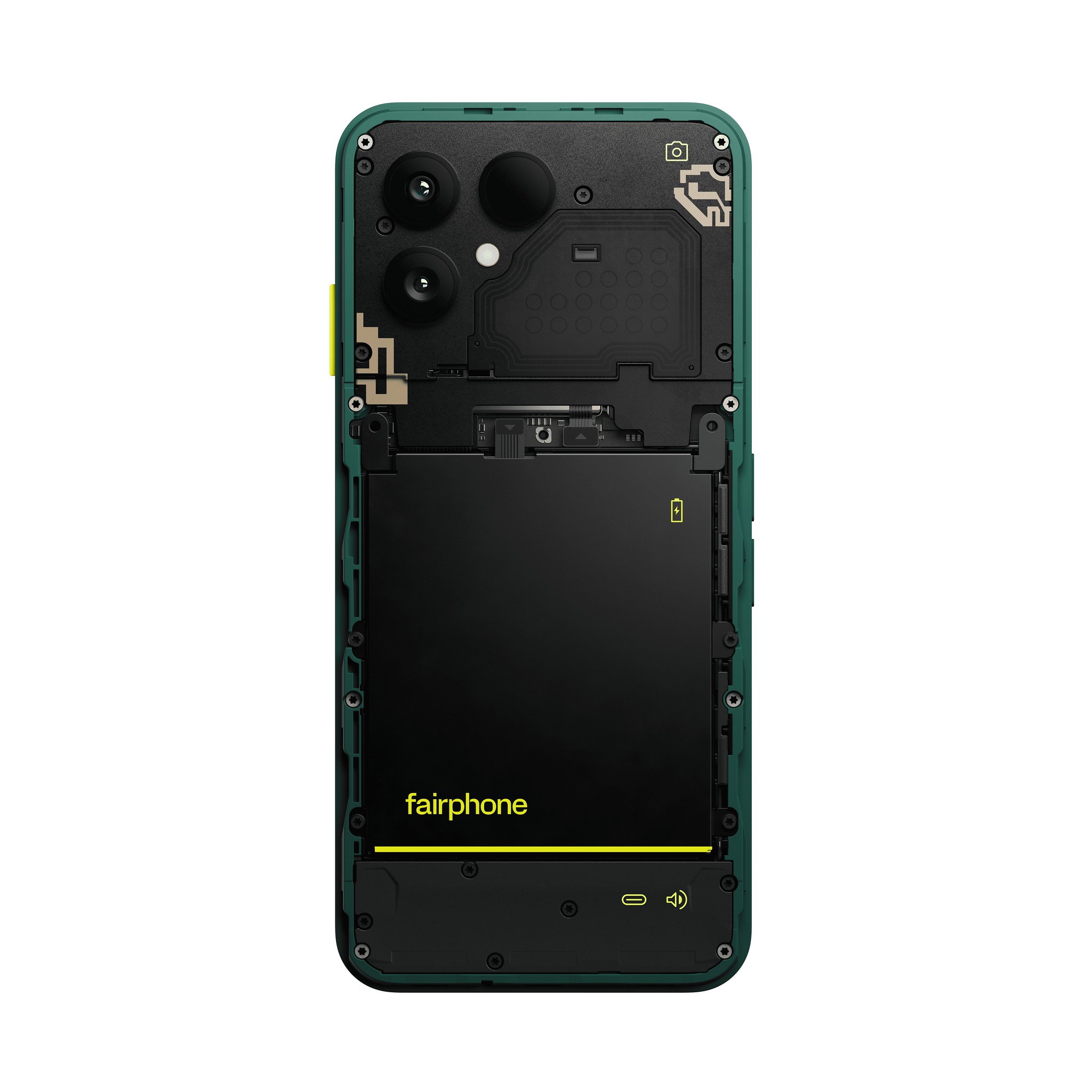
In practice. Commercial modular smartphones with repair documentation and replaceable parts. The photograph shows Fairphone Gen. 6.
What to keep in view
The photograph shows Gen. 6, not Gen. 6+. Software-support dates are commitments. Repairability does not by itself establish how long owners keep a device or its full environmental advantage.
What is actually behind the cover?
In its July 2025 teardown, iFixit opened the Gen. 6 by removing two T5 Torx screws and sliding away the back cover. The battery underneath has four screws and a cable connection. The display is also screwed in place rather than glued shut.
The USB-C charging port is a separate component beneath the speaker assembly. That detail matters when a connector is damaged: the part that meets the charging cable can be replaced without replacing the whole phone. The rear cameras are individually replaceable too.
A repair begins before the screwdriver
Fairphone’s repair service starts with diagnosis, then offers two routes: fitting a supported part yourself or sending the device to a repair centre. Its Gen. 6 guides give estimated times of 5–10 minutes for the battery and 10–15 minutes for the display. These are the maker’s estimates; the useful thing is being able to inspect the task before choosing it.
Not every component belongs on the kitchen table. iFixit notes that Fairphone does not classify the mainboard as user-serviceable. The everyday value is a choice between a documented home repair and a service route, according to the fault and the owner’s confidence.
Keep the phone, not just its shell
Fairphone lists twelve user-replaceable parts for the Gen. 6 and commits to software support and spare-parts availability through 2033. The hardware and the support period address different reasons a working-looking device can become difficult to keep.
For an owner, the practical question is small and specific: can I get the part for my model, understand the procedure and return to using the phone? A worn battery should not force a decision about an entirely new screen, camera and processor. Fairphone makes that separation visible in the object and in the service around it.
Start with Fairphone’s diagnosis and choose your exact model. Compare the guide, replacement part and repair-centre option before deciding how to proceed.
Find a repair guideSources (5)
- iFixit · Gen. 6 teardown, 3 July 2025
A documented disassembly by iFixit, distinct from the manufacturer’s specifications.
- Fairphone · Diagnosis, repair routes and Gen. 6 guides
- Fairphone · Gen. 6 parts and support commitments
- Fairphone · Original battery photograph
- Fairphone · Gen. 6 with both back covers removed
Read next.

A tiny repair with a much bigger effect.
Both separate a small failure from the fate of the whole product. The availability and fit of the replacement part make repair practical.
A phone with a deliberate offline state.
Two different design priorities for everyday electronics: control of attention and replaceable hardware. Neither removes the need for useful software and long-term support.